Showing posts with label Apps. Show all posts

Top Things To Do After Installing Luna

After elementary OS Luna has been officially released, a surge of new eOS users has arrived, and we are here to help. Everyone, including me, loves a "Top Things To Do After Installing..." list, so let's get you started.

UPDATE

After you have a freshly installed copy of elementary OS Luna at your hand, the first thing you should do is check for updates. You can either use the Update Manager by clicking on Applications (located on the top left corner) and looking for it there, or by opening your terminal (shortcut to open: CTRL + ALT + T) and typing:

sudo apt-get update && sudo apt-get upgrade
Updating your system is always a good idea. Updates include bug fixes, security patches, and new features!
MIDORI AND FLASH

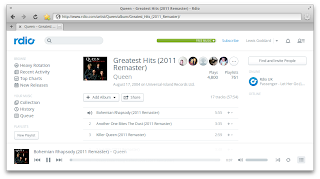
eOS comes with the awesome lightweight browser Midori (pronounce it “midoɺi”, with a Spanish/ Japanese “r”). To get Flash working for it, you'll need to install ndiswrapper and do some tweaking, but don't fret, it's easier than it sounds. Just open up your Terminal (CTRL + ALT + T) and type in:

sudo apt-get install flashplugin-installer nspluginwrapper
sudo nspluginwrapper -i /usr/lib/flashplugin-installer/libflashplayer.so
nspluginwrapper -v -a -n -i
Update: Lewis Goddard has created a script that fixes flash in Midori if the above does not work for you here. Just follow the instructions provided there.
That's it, Midori should run Flash now!

OTHER BROWSERS

If you prefer to use Firefox or Chromium, no problem!

Install Firefox

You can set up Firefox to fit in elementary OS perfectly as described here.

Like Chrome/Chromium? No Problem.

Install Chromium

Theme Chromium to fit into eOS as described here.

COMMUNITY PPA

Elementary Update has set up a community driven repository for third party applications, themes and more, all tailored to fit right into eOS. You can easily add the PPA to your system by opening your Terminal (CTRL + ALT + T) and typing:

sudo apt-add-repository ppa:versable/elementary-update
sudo apt-get update

With the community PPA enabled you can now do the following.
ELEMENTARY TWEAKS

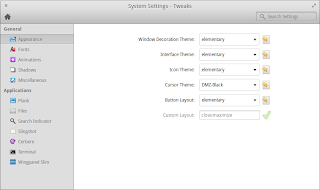
You might be familiar with Gnome Tweak Tool or Ubuntu Tweak. Well, for elementary OS we have elementary Tweaks. With elementary Tweaks you can easily change advanced settings that are otherwise hidden in elementary OS and more!

Install elementary Tweaks

Once installed, you'll be able to access it by opening the System Settings and clicking on Tweaks. There are even more options in Tweaks that you can unlock by reading on and following the instructions.
WINGPANEL SLIM

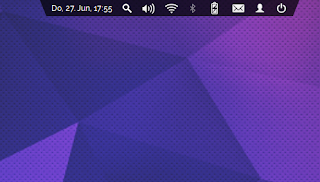
Wingpanel, the super sexy space-saving top panel of eOS, is great as it is, but you might want something even more space saving due to a small screen or your personal preference. +Heath Paddock has forked Wingpanel and coded the awesome Wingpanel Slim. It is customizable through elementary Tweaks once installed.

Install Wingpanel Slim

Once installed, open elementary Tweaks, activate Wingpanel Slim by hitting the switch, and customize it to your liking.
INDICATOR SYNAPSE

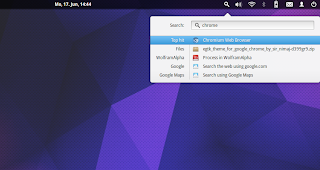
+Tom Beckmann, the developer behind Gala, elementary's Window Manager, has coded a search indicator based on Synapse.

Install Indicator Synapse

Once installed, log out and back in and you'll have a search icon in your panel. You can change the keyboard shortcut with elementary Tweaks!
APPS

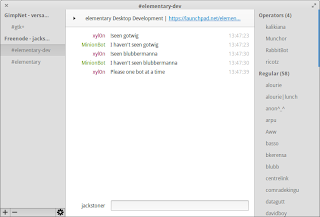
There are also a bunch of elementary styled applications in the Community PPA. Here is a list of their package name and a short description:
  • audience - A modern media player
  • birdie-granite - Twitter client for elementary OS
  • cable - IRC client for elementary OS
  • etube - Youtube viewer for elementary OS
  • feedler - Awesome RSS reader
  • foto - A very simple image viewer
  • gazette - Clock, news and weather for your desktop
  • nuvolaplayer - cloud music integration


Install Third Party Apps


THEMES

Albeit the awesome default elementary theme, the community has created a slew of astonishing themes and icon themes too.
  • elementary-blue-theme
  • elementary-champagne-theme
  • elementary-colors-theme
  • elementary-dark-theme
  • elementary-harvey-theme
  • elementary-lion-theme
  • elementary-matteblack-theme
  • elementary-milk-theme
  • elementary-plastico-theme
  • elementary-whit-e-theme


Install Themes

ICON THEMES

The same goes for icon themes that have been customized to fit eOS, here is the available list:
  • elementary-elfaenza-icons
  • elementary-emod-icons
  • elementary-enumix-utouch-icons
  • elementary-nitrux-icons
  • elementary-taprevival-icons


Install Icon Themes

OTHER THEMES

If you like the default elementary OS icon theme, you should install elementary-thirdparty-icons, which provides additional icons for thirdparty apps:

Install Icons for Thirdparty Apps

Additionally, you can install extra Plank (the Dock that elementary OS uses) themes:

Install Dock Themes

How about some awesome new wallpapers?

Install Wallpapers Collection

UPDATE YOUR KERNEL

Since elementary OS is based on Ubuntu 12.04, it uses a rather outdated kernel. If you have any hardware issues, you might be able to fix them by installing a backport of Ubuntu's 13.04 Kernel. Although some users report that newer kernels don't work well for them. Note: You can always revert.

Install Raring Generic Linux

Reboot and it should work! If booting fails, you can boot with your old kernel by holding down SHIFT during the boot process, you can now choose your old kernel, boot up, and remove the linux-generic-lts-raring package from Software Center.
That's it! You should be all set to customize elementary OS Luna to your needs.
Read More

Birdie Needs Your Help!

Birdie, our favorite elementary OS styled Twitter client, has started an Indiegogo campaign.
It is trying to raise funds to:
  • Implement missing Twitter features
  • Make Birdie rock solid, without crashes and weird bugs
  • Integrate and test Birdie on the most popular distributions, so Birdie feels great whether you use Ubuntu, elementary OS, Fedora, etc.
  • Optimize Birdie so it runs and feels faster
  • Create packages and repositories for the most popular distributions
  • Continue developing free open-source software that everyone can use, modify and redistribute
So head on over to Indigogo and contribute what you can!

If you want to try out Birdie, it is available in our Community PPA! If you have the PPA activated, install it through the Terminal with: sudo apt-get install birdie-granite
Read More

Community PPA Update #1

A lot has happened recently in the elementary community, so it's time for a round up.

CABLE

For starters, +Eduard Gotwig released a new version of the IRC client Cable, which is based on Sushi IRC. It brings visual improvements and a lot of bug fixes, like the buggy user list it used to have, with it.

The newest version is available through the Community PPA, and can be installed with: sudo apt-get install cable

elementary Tweaks

Elementary Tweaks has gone through a lot of changes. The most obvious is the new UI, which was done by +Tom Beckmann. The flexibility of the new UI allows more settings to be added.
Additionally to the new UI, Terminal settings have been added by Tom Beckmann and, thanks to the work of +Heath Paddock, Wingpanel Slim can now be aligned.

Icon theme emod

+Luca Di Martino has been working on an impressive new flat icon theme for elementary OS.
He recently release the icon theme, which, of course, is also available through the Community PPA: sudo apt-get install elementary-emod-icons

New Plank Themes

Due to the new popular trend of using Plank in Panel mode, +Kevin Kleinman released 3 new Plank themes: sudo apt-get install elementary-plank-themes

Time off

Elementary Tweaks development and the Community PPA maintenance will be put on hold for a week, as I am taking some time off for a beach vacation. You can still send me questions/feedback/suggestions for elementary Tweaks and the Community PPA per email at versable@gmail.com and I will check my inbox when I get back.
Read More

Safely use Wingpanel Slim

There has been an uproar in the elementary community ever since +Heath Paddock introduced Wingpanel Slim, a Wingpanel hack that greatly reduces Wingpanels size and increases the usable space on the desktop.

When Wingpanel Slim was introduced it brought a couple of problems: It replaced Wingpanel, making it rather complicated to switch back to the original Wingpanel, and it broke Galas Workspaces. These problems have been taken care of recently.

I have packaged Wingpanel Slim, so it doesn't collide with Wingpanel, and +Tom Beckmann has fixed the Gala Workspace issue. Additionally, elementary Tweaks now includes an option for Wingpanel Slim, making it easy to switch between the two panels.

Installation

You will need to have the Community PPA activated, elementary Tweaks installed and an updated system for the Gala fix. Check this post for instructions on installing the Community PPA and elementary Tweaks. If you already have the Community PPA and elementary Tweaks installed, open up your Terminal (CTRL+ALT+T) and type in:

sudo apt-get update
sudo apt-get upgrade
sudo apt-get install wingpanel-slim

That's it! Switching to Wingpanel Slim and back to Wingpanel is easily done by opening up the elementary Tweaks plug from your System Settings and activating or deactivating the Wingpanel Slim option located under the Appearance tab. You might want to log out and back in for the Gala fix to take effect.
Read More

Finally, Elementary Tweaks!

While elementary OS is certainly great out-of-the-box, users have and will always tweak it to their preferences. We have posted a lot of How-To articles that let you delve deep into the system and add new functionality, change appearances and so forth.


A tool similar to Gnome Tweak Tool or Ubuntu Tweak, specifically tailored to elementary OS, has been requested many times before. Well you are in luck my friend, because here is just that: elementary Tweaks!


With elementary Tweaks, you can change themes, configure advanced Plank options, tweak animation timings, configure Files and Slingshot. And the best of all? It is written as a plug and therefor integrates into switchboard!


But that's just the icing on the glorious tweaking cake, now comes the frosting. I have packaged the Nitrux and the El Faenza icon theme that were specifically tailored for elementary OS for you. Additionally, I've thrown in some awesome elementary themes from DeviantArt user kxmylo.


It doesn't stop here! You may have noticed the Workspace Overview and Show Desktop icon settings in the first screenshot. They add functional icons that just do what they say to Plank and are based on +Tom Beckmanns Vala script, Sergey "Shnatsel" Davidoffs .desktop file and the icons from our friend TraumaD91.


Enough with the teasing, let's get you hooked up with elementary Tweaks. First of all, if you haven't already, activate the elementary Community PPA by opening your terminal (CTRL+ALT+T) and typing:
sudo apt-add-repository ppa:versable/elementary-update
sudo apt-get update

Then install elementary Tweaks:
sudo apt-get install elementary-tweaks
Optionally, install additional elementary themes: sudo apt-get install elementary-dark-theme elementary-plastico-theme elementary-whit-e-theme elementary-harvey-theme
And the optimized icon themes: sudo apt-get install elementary-elfaenza-icons elementary-nitrux-icons
How about a bunch of Plank themes: sudo apt-get install elementary-plank-themes

ISSUES

Elementary Tweaks works great as it is. There are, however, some issues with the theming. After you have changed a window decoration or an interface theme it might not apply correctly. Just log out and back in and everything should be fine. Also bear in mind that elementary OS only supports GTK 3.4 themes. If there is another problem, don't hesitate to post a bug here and I'll try to fix it as soon as possible.

TRANSLATIONS

Currently elementary Tweaks is available in English and German, but with your support it can be available in your language too! Just set up an account on Launchpad, read the Translation Guide and start translating!

CREDITS

Although I did write this plug, it is heavily based on code from +Tom Beckmann, so much credit goes to him as well.
Read More

Install and use Indicator Synapse

Yesterday +Eduard Gotwig pointed me to a new Synapse frontend, Indicator Synapse, a search indicator made by +Tom Beckmann. The indicator is similar to Spotlight. When installed, it adds search functions elementary OS currently lacks.


As of now, the indicator has some bugs and did glitch for me, but it had no problems finding everything I searched for.

You can either get indicator synapse from the Community PPA or Eduards PPA.

Here are instructions for installing indicator synapse from the Community PPA. If you already have the Community PPA added, you may skip this step. Open up the Terminal (CTRL+ALT+T) and type:

sudo apt-add-repository ppa:versable/elementary-update
sudo apt-get update


Now install the package indicator-synapse:

sudo apt-get install indicator-synapse

Log out and back in and you should be all set!

INSIGHT

The future of the indicator is uncertain, since the Synapse Project seems abandoned (The last revision on Launchpad was uploaded in 2012). A viable option would be to fork it for elementary OS, which would require it to be properly maintained and have active developers work on it.
Update: Indicator Synapse has since been updated. It is now possible to launch the search indicator with the keyboard shortcut ALT+SUPER+SPACE
Read More

Crowd-Funding Games Weekly #3

Once again, here are a couple of games with Linux support currently crowd-funding, as well as some looking back on the projects we previously featured.


Stonehearth

Stonehearth is a cross-platform voxel in which you can build "cities" and castles, craft weapons, and embark on epic quests. Surprisingly good looking thanks to excellent textures, the distinct medieval theme, and with nearly 5 times the $120,000 goal, it's already hit stretch goals for PvP and Co-op multiplayer.


The campaign ends in two-and-a-half days, and you can get a copy of the game for $15 (slated for release in September 2014, which is a good 16 months away). Beta access is $30, and scheduled for December 2013.

Stonehearth on Kickstarter

Ray's The Dead

Convert your victims and discover your past, and the events that lead to your untimely death as you play as Ray, a suddenly-resurrected zombie with a spark of intelligence and a giant light-bulb sticking out the back of his head that is used to control his zombie hordes.


You can pre-order Ray's The Dead for $15, which gets you either a DRM-Free copy for Windows, OS X or Linux, or a Steam key, pending the passing of Steam Greenlight. There is also 500 copies up for an early bird offer of $12. $50 gets you beta access.

Flashbacks


A.N.N.E was fully funded, raising $100,000 towards a $70,000 goal.

AR-K also raised it's funds, cutting it a little close with $101,564 for a goal of $100,000.

Jagged Alliance: Flashback encountered a surprising drive towards the end of it's campaign, raising $100,000 in it's last three days alone.

Rawbots has seen a surge recently, but still hasn't raised 10% of it's $300,000 target, and ends in less than a week.

Son of Nor has also seen a recent influx, but still has yet to be funded, with less than three days left.

Realm failed to reach it's funding goal, raising less than half of it's target.

Dog Sled Saga more than doubled it's goal, just reaching it's last stretch goal of $14,000.
Read More

Third-Party App: Nuvola Player

Nuvola Player is a third-party application that runs a web interface of cloud music services in its own window. Currently supported services are Google Music, Amazon Cloud Player, Grooveshark, Pandora, Hype Machine, Rdio, and 8tracks.
When you first open Nuvola Player, it displays all the available streaming options. Simply sign into a service, and you're listening to music in no time.
If you're looking for strong, consistent design aesthetics between each app, you've misundertood Nuvola. It simply frames the web-service in a standalone app. Here is Pandora in all its visual and audio ad glory.
One bright spot is the Rdio. Their interface is so minimal, making it fit in nicely on an elementary desktop.
To install, add the Nuola Player PPA by pasting the following into terminal. sudo add-apt-repository ppa:nuvola-player-builders/stable
sudo apt-get update
sudo apt-get install nuvolaplayer
Finally, friend of the site and all around great icon designer, TraumaD91, has made a stunning Nuvola icon for elementary users. To use, simply download the icon pack, and extract it to ~/.icons/elementary/apps.

Enjoy.
Read More

Steam Sales


Rochard   -   $9.99   -   75%   -   $2.49

Rochard is a side-scrolling space-platformer with inspiring graphics and gameplay. It's something I'm currently playing through and thoroughly enjoying.


Spectraball   -   $4.99   -   33% off   -   $3.34

A puzzle-solving platformer, Spectraball is the only game on this list I must admit to not having played. For this price, I soon won't have to though!


Steel Storm: Burning Retribution   -   $4.99   -   40%   -   $2.99

Steel Storm: Burning Retribution is a top-down old-school shot'em up. With myriads of levels, enemies, and community content, I don't think you can ever actually say you've finished this.


All offers end 27th May.


Flashbacks


The ever beautiful Realm sadly wasn't funded, raising just short of half it's goal. Jagged Alliance: Flashback gained some serious funds in the last few days and just made it's goal, and anyone that listened to me either got the 4 classic-pack games for $5, or that and Flashback for $25 (I got the latter). A.N.N.E also got funded, barely breaking the $100,000 mark,

Finally, (just in case you're new to my posts) Dog Sled Saga is an adorable 8bit masterpiece, and you can get the game for just $5. Hurry, their Kickstarter only has two days to go!
Read More

Crowd-Funding Games Weekly #2

I'm back again, listing another three crowd-funding games for elementary (and Linux in general) with around two weeks of funding left, as well as some looking back on the projects we previously featured.


Son of Nor - The World is Your Weapon

Son of Nor looks set to be one of those terrifically geeky games, which also features a multitude of co-op opportunities (split-screen, lan, internet). Unfortunately, in my (fairly experienced) crowd-funding opinion, they probably won't get funded.


Son of Nor will be available for Windows, Max and Linuz, DRM Free (nothing about Steam keys, but they're on Greenlight all right) by pledging $15 on their Kickstarter for one of the early bird copies of the game (limited to 300).

Update: It looks like early bird copies are all sold out (there wasn't many left when I wrote this). It's now $20 for a standard copy.


AR-K

AR-K is a Saga that is looking to have the second, and maybe third and fourth episodes funded on Kickstarter. They have promised a linux version, but it will require some porting (from Unity 3.6 to 4) and while the first episode is already out (which you can get for free), there's been nothing said about porting that over to Linux.

Overall, this point-and-click adventure isn't for me (they rarely are), but I'm sure there are plenty of you out there willing to pledge $20 for the complete game.

Rawbots

Rawbots is a create'em, program'em, build'em, fight'em game (okay, I made that up). They describe it as a sandbox games, where you get to craft elegant or elephant robots, visually program them, and then basically do whatever you want. FPS, RTS, CTF, or just build as high as you can, it's completely up to you.


$20 bags you a DRM-Free copy, as well as a Steam key (when, and if, available), and 1 Online Multiplayer user. The limit of 15,000 for this "first call" has hardly been dented.

Rawbots is my favourite of this week, mainly because of the creative element. It's like Minecraft, but with Robots! Unfortunately, it is also the least funded of what has rapidly turned into a low-on-funds week (I know how they feel). All is not right in the crowd-funding world.


Honourable Mentions


There are no honourable mentions this week, as Games on Kickstarter appear to have hit somewhat of a slump. Hopefully the three games i have lined up for next week will fare a little better than those of recent times.

Flashbacks


A.N.N.E has now reached it's Linux stretch goal of $80,000, and has just over two days of funding to go. During that time, you can still join the ranks of over three-thousand others and get a copy (and a Steam key!) for the fundraising price of $10.

Jagged Alliance: Flashback is just three days away from the end of the campaign. Unfortunately, it's beginning to look like this means it's just three days away from not getting funded. Remember, you can get the Classic Pack (that's 4 games!) and half-price off release for just $15, or pony up the full $25 up-front to grab yourself a copy of the game.

Realm site just below £80,000 of a £195,000 goal, with just over two days to go. £10 (~$15) gets you a copy and shows support for a beautiful game, or get two copies for £17 (~$26).

Among the Sleep was fully funded just yesterday, raising $248,358 out of a $200,000 goal from 8,110 backers. General release is slated for December 2013, but do remember that nearly three-quarters of Kickstarter Projects deliver late. In the mean time, you can try out the public alpha.

And finally, for just $5, you really can't go wrong. And Dog Sled Saga looks set to be adorable, as well as being within reach of doubling their goal of $6,000.
Read More